
Role
Product Designer
Team
Product Designer, Product Manager, 2 Engineers
Timeline
Q3 2023
Performance tracking is everything in marketing
Performance tracking is everything in marketing. With adding link tracking parameters for specific campaigns, users can learn which actions a subscriber takes from which email, like if their holiday sale campaign drove more traffic than their newsletter.
The problem
Attentive's UTM (or link) tracking only worked at the "source" level. It could not be enabled at a per-email basis. The settings were also in an odd place: the Offers tab. This confused users when trying to set up link tracking as they expected to see the feature in "Settings". Link tracking was also referenced as "Google Analytics", which alienated users who utilized different tools for their data.
User stories
I want to customize the default query parameters and values that will be appended to every link in a SMS or Email message in order for deeper performance tracking within my third party attribution platform of choice (e.g. Google Analytics, Adobe, etc)
Within each SMS or Email message composition flow, I want to edit my query parameters to further customize what gets appended to each link in a message in order to avoid manual errors and save time.
I want the utm_campaign value set at the global level to be added to all email messages by default in order to avoid emails being sent without the ability to be tracked in my source of truth.
If I have Link Tracking turned on at the message level, I want links in that message to send with the query parameters I expect in order to ensure I can evaluate performance accordingly outside of Attentive’s UI (Google Analytics).
I want to remove the ability to customize query parameters in the Offers tab aside from setting a utm_term in order to avoid confusion for clients and keep link tracking settings within the Settings tab and at the message level only.
User story 1: Global query parameters
This story had two major requirements: First, all mentions of Google Analytics would be updated to "Link Tracking" and "UTMs" update to "query parameters (e.g. UTMs)" to be more universal. Second, UTM Source would always be Attentive and the UTM Medium would be set to SMS for SMS and Email for Email respectively.
First exploration
I started with a global toggle that the client could switch on. Once enabled, UTM Source and UTM Medium fields and the "Add a Custom UTM" CTA would appear. The user could add a custom UTM and save their settings.
UX flow


Prototype

Second exploration
The first iteration had some issues: it didn't use the horizontal space well enough. It also didn't make obvious the fields that could not be updated. We also added content, campaign, and term UTMs as they're commonly used parameters. I added functionality for defining global campaign and journey values in this iteration versus defining only on a per-campaign/journey basis. I adjusted the layout to utilize more space. Source, Medium, and Campaign UTMs would always be flipped on when Link Tracking is enabled. Medium and Source could be turned off, but Source would always be enabled when Link Tracking is enabled. I also added a toast notification when the client saved their settings. I also designed a version of the design that didn't have the email block for non-email clients.
Information architecture

Prototype

Third Exploration
The third exploration was judged in parallel. Instead of separating the columns by campaign and journey values, they'd be separated by medium: SMS and Email. This allows for less of a long scroll, but also has less control versus the previous exploration. I also added dropdowns so users could select common parameters for Campaign, Content, and Term.
Information Architecture

Prototype

User story 2: Email
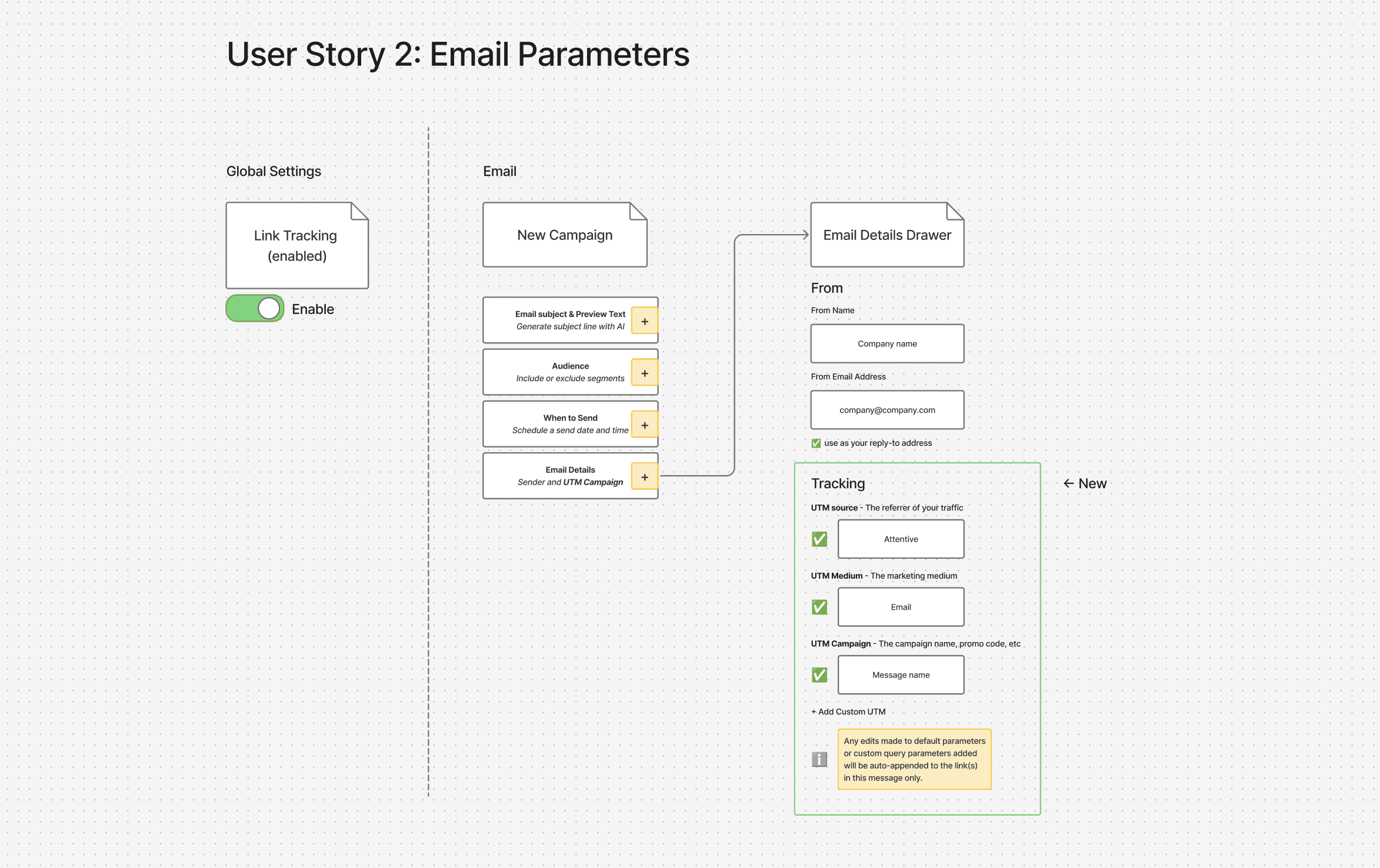
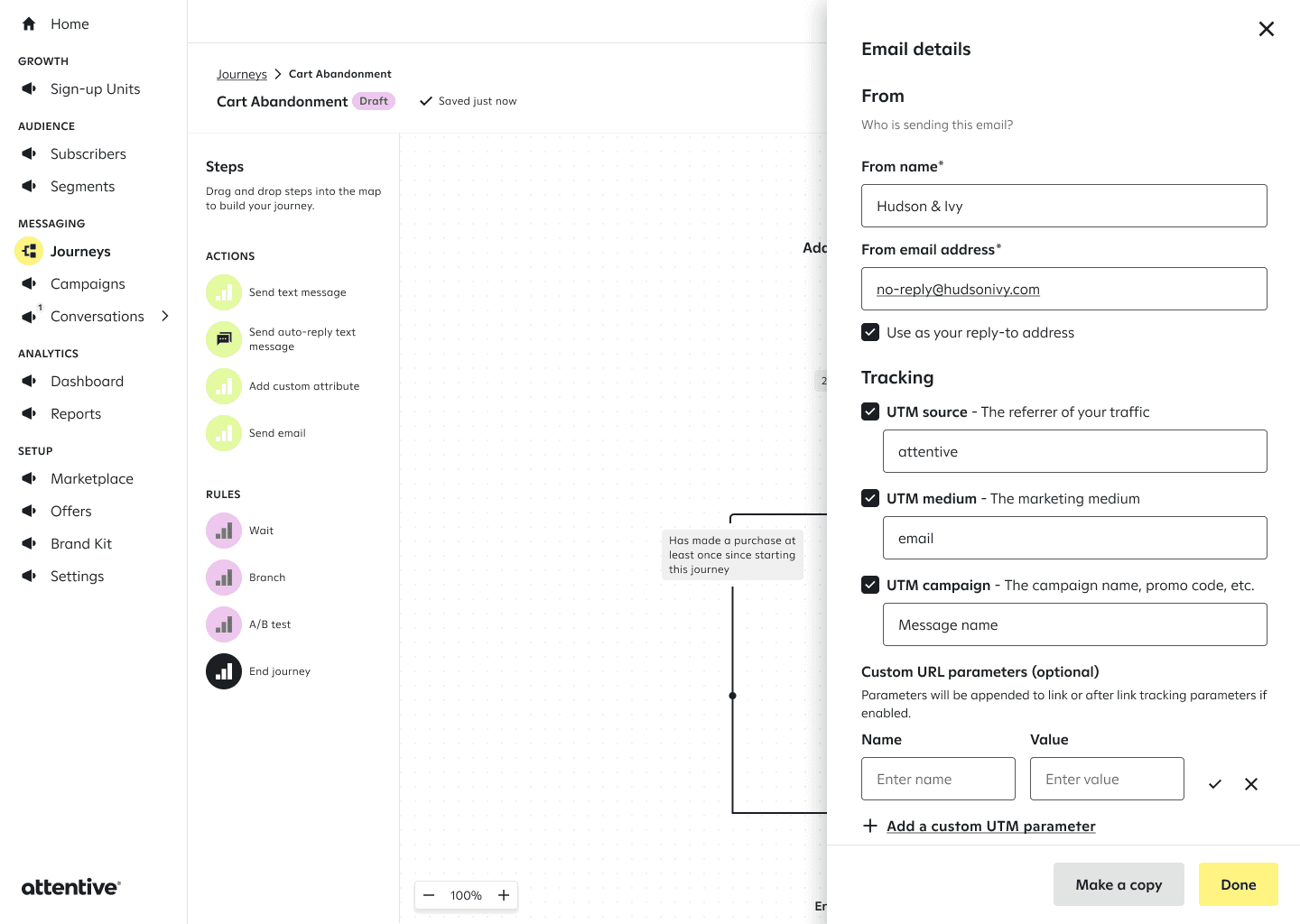
For email, we needed the ability to set the utm_campaign value at the global level and added to all email messages by default. in order to avoid emails being sent without the ability to be tracked in my source of truth. We also needed to design a way for the user to edit query parameters to further customize what gets appended to each link.
First exploration
I decided to add the UTM info in the Email Details section.
UX flow
Campaign Builder: Prototype

Journeys and A/B Test

Second exploration
The first iteration had some issues: it didn't use the horizontal space well enough. It also didn't make obvious the fields that could not be updated. We also added content, campaign, and term UTMs as they're commonly used parameters. I added functionality for defining global campaign and journey values in this iteration versus defining only on a per-campaign/journey basis. I adjusted the layout to utilize more space. Source, Medium, and Campaign UTMs would always be flipped on when Link Tracking is enabled. Medium and Source could be turned off, but Source would always be enabled when Link Tracking is enabled. I also added a toast notification when the client saved their settings. I also designed a version of the design that didn't have the email block for non-email clients.
Information architecture
Prototype
Third Exploration
The third exploration was judged in parallel. Instead of separating the columns by campaign and journey values, they'd be separated by medium: SMS and Email. This allows for less of a long scroll, but also has less control versus the previous exploration. I also added dropdowns so users could select common parameters for Campaign, Content, and Term.
Information Architecture
Prototype
User story 3: SMS
Editing query parameters also needed to be enabled for SMS messages. We needed this to seamlessly work within the established flow while providing the end users control.
First exploration
I started with a global toggle that the client could switch on. Once enabled, UTM Source and UTM Medium fields and the "Add a Custom UTM" CTA would appear. The user could add a custom UTM and save their settings.
UX flow
Prototype
Second exploration
The first iteration had some issues: it didn't use the horizontal space well enough. It also didn't make obvious the fields that could not be updated. We also added content, campaign, and term UTMs as they're commonly used parameters. I added functionality for defining global campaign and journey values in this iteration versus defining only on a per-campaign/journey basis. I adjusted the layout to utilize more space. Source, Medium, and Campaign UTMs would always be flipped on when Link Tracking is enabled. Medium and Source could be turned off, but Source would always be enabled when Link Tracking is enabled. I also added a toast notification when the client saved their settings. I also designed a version of the design that didn't have the email block for non-email clients.
Information architecture
Prototype
Third Exploration
The third exploration was judged in parallel. Instead of separating the columns by campaign and journey values, they'd be separated by medium: SMS and Email. This allows for less of a long scroll, but also has less control versus the previous exploration. I also added dropdowns so users could select common parameters for Campaign, Content, and Term.
Information Architecture
Prototype
Final
The third exploration was judged in parallel. Instead of separating the columns by campaign and journey values, they'd be separated by medium: SMS and Email. This allows for less of a long scroll, but also has less control versus the previous exploration. I also added dropdowns so users could select common parameters for Campaign, Content, and Term.
Email feature flag
Feature on

Feature off

Prototype

Impact
The feature launched in Q4 of 2023. Urban Outfitters used link tracking to A/B test more effectively, finding a 19% increase in demand for group B. Blender Eyewear used SMS and Email tracking data to improve personalization, increasing email opens by 136% and increasing SMS revenue by 52% and halving their opt-outs.

Email: aubreycasazza@gmail.com
LinkedIn: linkedin.com/in/aubreycasazza
Copyright: © Aubrey Casazza 2026 All rights reserved.